This article describes the components and functions of the Company List.
The Company List shows all available companies based on the filter settings in the Layers Panel
The display follows the group/solo modes set in the Group/Solo Selector.
To search for all companies in the database use the Search Box at the top of the screen or the SFCR List.
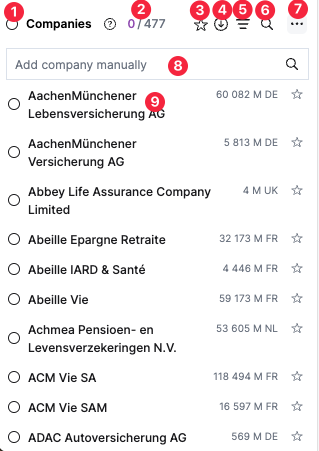
Company List layout
Select all companies
Company counter (selected / total)
Show favourites
Dowload all data
Show selected only
Search list
Company List menu
Add company manually Add companies to the filtered list
Company details Click to access Company View
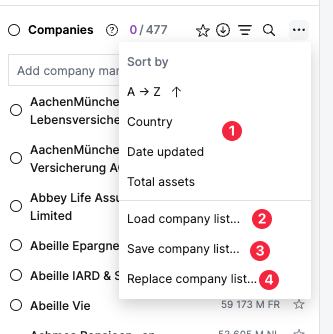
Company List Menu layout
List sorting Sort by name, country, date, total assets
Load company list This will overwrite the existing list
Save company list
Replace company list Replace the content of an existing list
Company List Presets
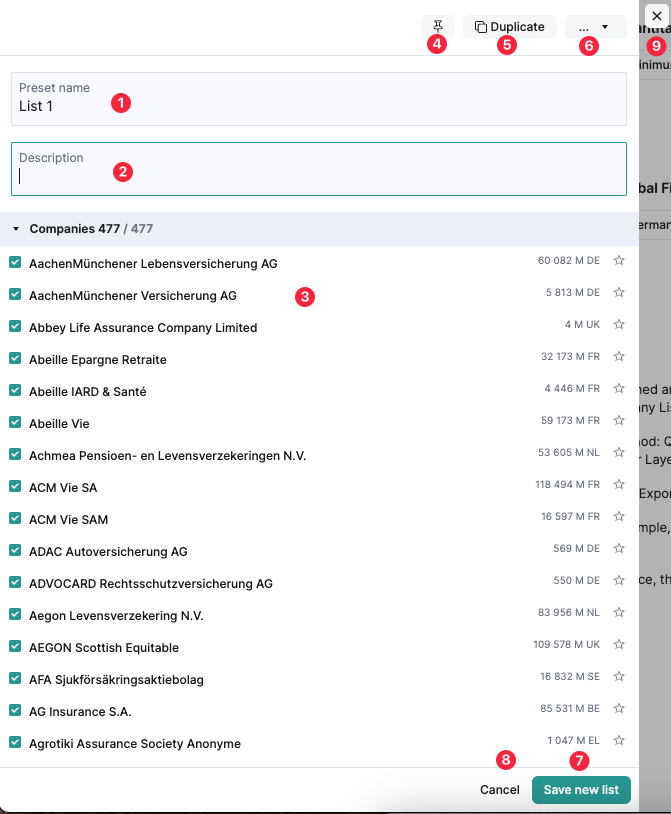
Save Company List layout
List name
List description
Selected companies Only selected companies will be saved
Pin list
Duplicate list
List delete menu
Save list
Cancel list without saving
Close list without saving
Load Company List layout
List name
List description
List detail Only selected items will be loaded.
Pin List Pins the list to the top of the saved lists
Duplicate list
Lists Delete menu
Cancel list
Load list
Close list window without saving
Search lists
List History If a list has been modified, view past versions.
Saved Lists
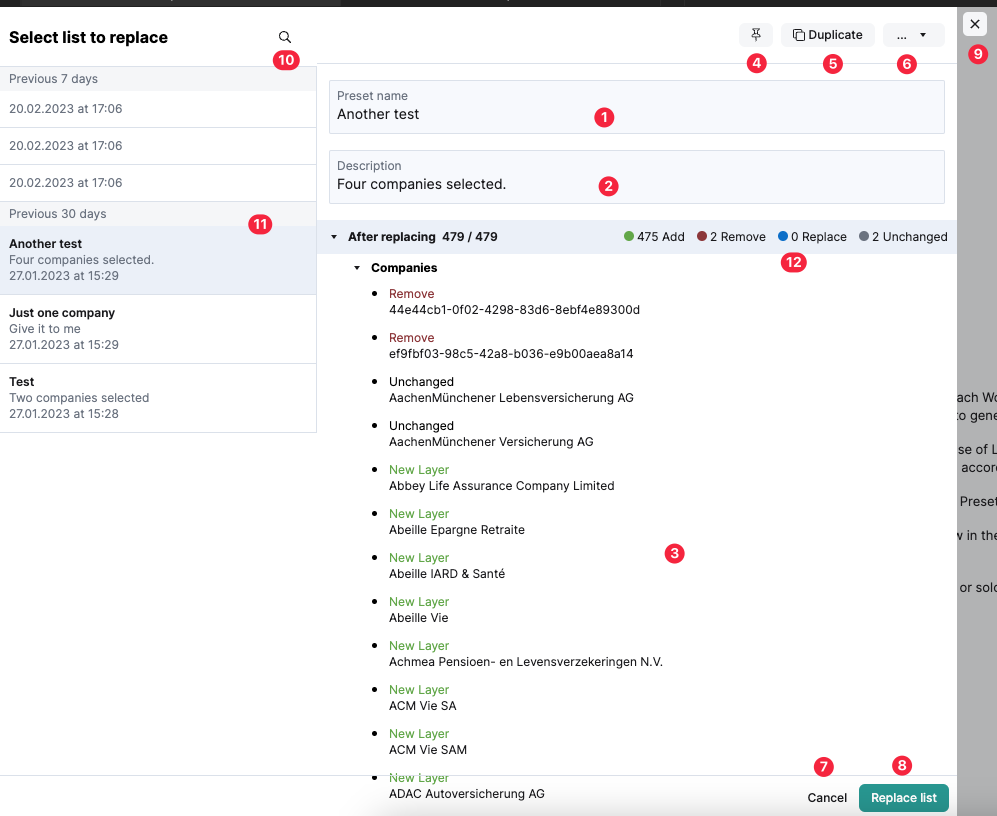
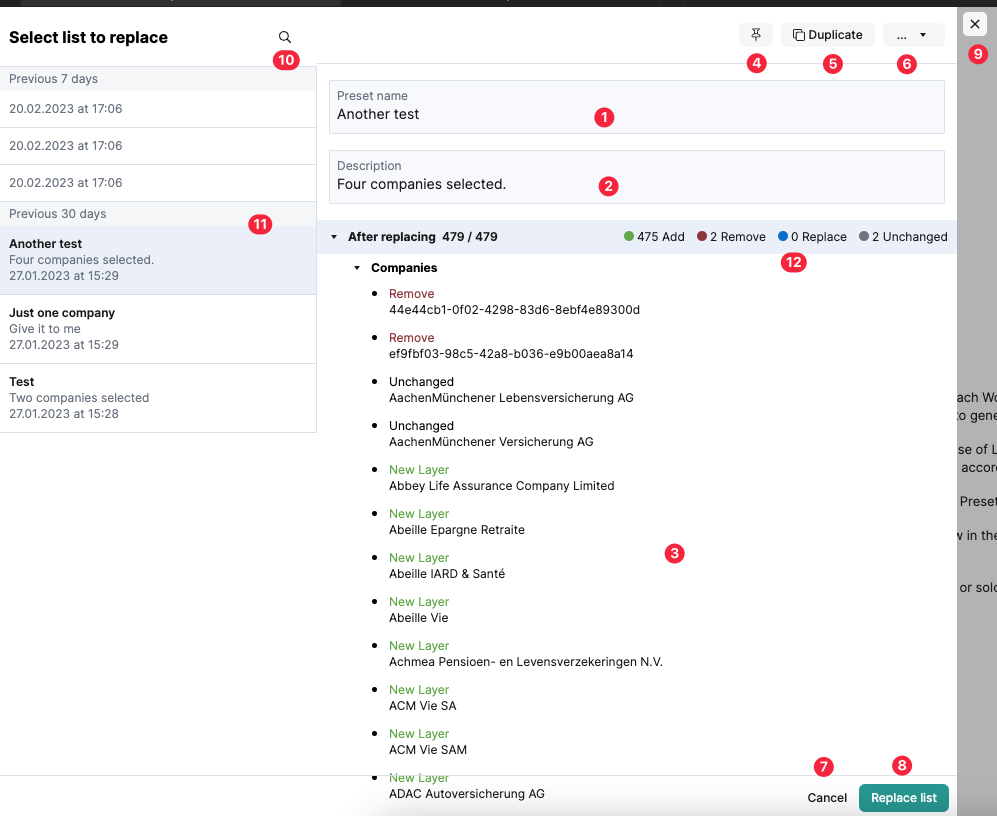
Replace Company List layout
List name
List description
List detail
Pins the list to the top of the saved lists
Duplicate list
List Delete menu
Cancel list
Replace list
Close list window without saving
Search lists
Saved list
Change details Details of the difference between the saved list and the current list that is intended to replace it.
This website uses cookies to improve your experience. We'll assume you're ok with this, but you can opt-out if you wish. Cookie settingsACCEPT
Privacy & Cookies Policy
Privacy Overview
This website uses cookies to improve your experience while you navigate through the website. Out of these cookies, the cookies that are categorized as necessary are stored on your browser as they are essential for the working of basic functionalities of the website. We also use third-party cookies that help us analyze and understand how you use this website. These cookies will be stored in your browser only with your consent. You also have the option to opt-out of these cookies. But opting out of some of these cookies may have an effect on your browsing experience.
Necessary cookies are absolutely essential for the website to function properly. This category only includes cookies that ensures basic functionalities and security features of the website. These cookies do not store any personal information.
Any cookies that may not be particularly necessary for the website to function and is used specifically to collect user personal data via analytics, ads, other embedded contents are termed as non-necessary cookies. It is mandatory to procure user consent prior to running these cookies on your website.